Termux ID: Log -->

HonSSH is a high-interaction Honey Pot solution.

HonSSH will sit between an attacker and a honey pot, creating two separate SSH connections between them.

Features
  • Captures all connection attempts to a text file, database or email alerts.
  • When an attacker sends a password guess, HonSSH can automatically replace their attempt with the correct password (spoof_login option). This allows them to login with any password but confuses them when they try to sudo with the same password.
  • All interaction is captured into a TTY log (thanks to Kippo) that can be replayed using the playlog utility included from Kippo.
  • A text based summary of an attackers session is captured in a text file.
  • Sessions can be viewed or hijacked in real time (again thanks to Kippo) using the management telnet interface.
  • Downloads a copy of all files transferred through wget or scp.
  • Can use docker to spin up new honeypots and reuse them on ip basis.
  • Saves all modifications made to the docker container by using filesystem watcher.
  • Advanced networking feature to spoof attackers IP addresses between HonSSH and the honeypot.
  • Application hooks to integrate your own output scripts.

Setup and Configuration

Useful links


Inspiration and Usage

KippoKippo is a medium interaction SSH honeypot designed to log brute force attacks and, most importantly, the entire shell interaction performed by the attacker. https://github.com/desaster/kippo
This project was inspired by Kippo and has made use of it's logging and interaction mechanisms.
BifroztAn awesome project using Honssh by Are Hansen - http://sourceforge.net/projects/bifrozt/

  • An all-in-one Honeypot Ubuntu Server ISO.
  • Uses iptables to provide some cool firewall mitigation rules.

HonSSH - Log all SSH communications between a client and server

The Port Scan Attack Detector psad is a lightweight system daemon written in is designed to work with Linux iptables/ip6tables/firewalld firewalling code to detect suspicious traffic such as port scans and sweeps, backdoors, botnet command and control communications, and more. It features a set of highly configurable danger thresholds (with sensible defaults provided), verbose alert messages that include the source, destination, scanned port range, begin and end times, TCP flags and corresponding nmap options, reverse DNS info, email and syslog alerting, automatic blocking of offending IP addresses via dynamic configuration of iptables rulesets, passive operating system fingerprinting, and DShield reporting. In addition, psad incorporates many of the TCP, UDP, and ICMP signatures included in the Snort intrusion detection system. to detect highly suspect scans for various backdoor programs (e.g. EvilFTP, GirlFriend, SubSeven), DDoS tools (Mstream, Shaft), and advanced port scans (SYN, FIN, XMAS) which are easily leveraged against a machine via nmap. psad can also alert on Snort signatures that are logged via fwsnort, which makes use of the iptables string match extension to detect traffic that matches application layer signatures. As of the 2.4.4 release, psad can also detect the IoT default credentials scanning phase of the Mirai botnet.
The complete feature list is below.

Features
  • Detection for TCP SYN, FIN, NULL, and XMAS scans as well as UDP scans.
  • Support for both IPv4 and IPv6 logs generated by iptables and ip6tables respectively.
  • Detection of many signature rules from the Snort intrusion detection system.
  • Forensics mode iptables/ip6tables logfile analysis (useful as a forensics tool for extracting scan information from old iptables/ip6tables logfiles).
  • Passive operating system fingerprinting via TCP syn packets. Two different fingerprinting strategies are supported; a re-implementation of p0f that strictly uses iptables/ip6tables log messages (requires the --log-tcp-options command line switch), and a TOS-based strategy.
  • Email alerts that contain TCP/UDP/ICMP scan characteristics, reverse dns and whois information, snort rule matches, remote OS guess information, and more.
  • When combined with fwsnort and the iptables string match extension, psad can generate alerts for application layer buffer overflow attacks, suspicious application commands, and other suspect layer 7 traffic.
  • Icmp type and code header field validation.
  • Configurable scan thresholds and danger level assignments.
  • Iptables ruleset parsing to verify "default drop" policy stance.
  • IP/network danger level auto-assignment (can be used to ignore or automatically escalate danger levels for certain networks).
  • DShield alerts.
  • Auto-blocking of scanning IP addresses via iptables/ip6tables and/or tcpwrappers based on scan danger level. (This feature is NOT enabled by default.)
  • Parsing of iptables/ip6tables log messages and generation of CSV output that can be used as input to AfterGlow. This allows iptables/ip6tables logs to be visualized. Gnuplot is also supported.
  • Status mode that displays a summary of current scan information with associated packet counts, iptables/ip6tables chains, and danger levels.

Visualizing Malicious Traffic
psad offers integration with gnuplot and afterglow to produce graphs of malicious traffic. The following two graphs are of the Nachi worm from the Honeynet Scan30 challenge. First, a link graph produced by afterglow after analysis of the iptables log data by psad:
"Nachi Worm Link Graph"

The second shows Nachi worm traffic on an hourly basis from the Scan30 iptables data:
"Nachi Worm Hourly Graph"

Configuration Information
Information on config keywords referenced by psad may be found both in the psad(8) man page, and also here:
http://www.cipherdyne.org/psad/docs/config.html

Methodology
All information psad analyzes is gathered from iptables log messages. psad by default reads the /var/log/messages file for new iptables messages and optionally writes them out to a dedicated file (/var/log/psad/fwdata). psad is then responsible for applying the danger threshold and signature logic in order to determine whether or not a port scan has taken place, send appropriate alert emails, and (optionally) block offending ip addresses. psad includes a signal handler such that if a USR1 signal is received, psad will dump the contents of the current scan hash data structure to /var/log/psad/scan_hash.$$ where "$$" represents the pid of the running psad daemon.
NOTE: Since psad relies on iptables to generate appropriate log messages for unauthorized packets, psad is only as good as the logging rules included in the iptables ruleset. Hence if your firewall is not configured to log packets, then psad will NOT detect port scans or anything else. Usually the best way setup the firewall is with default "drop and log" rules at the end of the ruleset, and include rules above this last rule that only allow traffic that should be allowed through. Upon execution, the psad daemon will attempt to ascertain whether or not such a default deny rule exists, and will warn the user if not. See the FW_EXAMPLE_RULES file for example firewall rulesets that are compatible with psad.
Additionally, extensive coverage of psad is included in the book "Linux Firewalls: Attack Detection and Response" published by No Starch Press, and a supporting script in this book is compatible with psad. This script can be found here:
http://www.cipherdyne.org/LinuxFirewalls/ch01/

Installation
Depending on the Linux distribution, psad may already be available in the default package repository. For example, on Debian or Ubuntu systems, installation is done with a simple:
apt-get install psad
If psad is not available in the package repository, it can be installed with the install.pl script bundled in the psad sources. The install.pl script also handles upgrades if psad is already installed. psad requires several perl modules that may or may not already be installed on your Linux system. These modules are included in the deps/ directory in the psad sources, and are automatically installed by the install.pl script. The list of modules is:
  • Bit::Vector
  • Date::Calc
  • IPTables::ChainMgr
  • IPTables::Parse
  • NetAddr::IP
  • Storable
  • Unix::Syslog
psad also includes a whois client written by Marco d'Itri (see the deps/whois directory). This client does better than others at collecting the correct whois information for a given IP address.

Firewall Setup
The main requirement for an iptables configuration to be compatible with psad is simply that iptables logs packets. This is commonly accomplished by adding rules to the INPUT and FORWARD chains like so:
iptables -A INPUT -j LOG
iptables -A FORWARD -j LOG
The rules above should be added at the end of the INPUT and FORWARD chains after all ACCEPT rules for legitimate traffic and just before a corresponding DROP rule for traffic that is not to be allowed through the policy. Note that iptables policies can be quite complex with protocol, network, port, and interface restrictions, user defined chains, connection tracking rules, and much more. There are many pieces of software such as Shorewall and Firewall Builder, that build iptables policies and take advantage of the advanced filtering and logging capabilities offered by iptables. Generally the policies built by such pieces of software are compatible with psad since they specifically add rules that instruct iptables to log packets that are not part of legitimate traffic. Psad can be configured to only analyze those iptables messages that contain specific log prefixes (which are added via the --log-prefix option), but the default is for psad to analyze all iptables log messages for evidence of port scans, probes for backdoor programs, and other suspect traffic.

Platforms
psad generally runs on Linux systems, and is available in the package repositories of many major Linux distributions. If there are any operational issues with psad, please open an issue on psad

psad - Intrusion Detection and Log Analysis with iptables


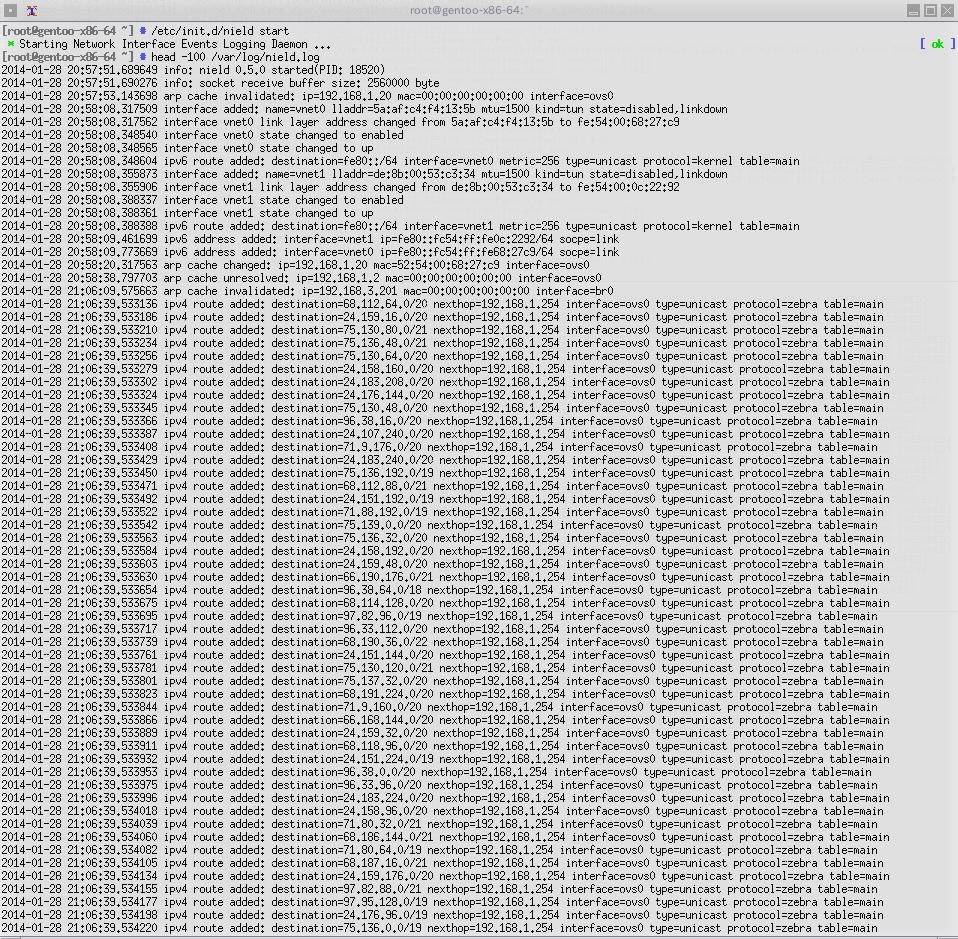
NIELD (Network Interface Events Logging Daemon) is a tool to receive notifications from kernel through netlink socket, and generate logs related to interfaces, neighbor cache (ARP,NDP), IP address (IPv4,IPv6), routing, FIB rules, traffic control.

Download 
$ git clone https://github.com/t2mune/nield.git

Install
$ ./configure
$ make
# make install

Usage
nield [-vh46inarft] [-p lock_file] [-s buffer_size] [-l log_file] [-L syslog_facility] [-d debug_file]

Options
Standard options:

-v Displays the version and exit.

-h Displays the usage and exit.

-p lock_file
Specifies the lock file to use. Default is "/var/run/nield.pid", if not specified.

-s buffer_size
Specifies the maximum socket receive buffer in bytes.

Logging options:
It uses the log file "/var/log/nield.log", if neither "-l" nor "-L" specified.

-l log_file
Specifies the log file to use.

-L syslog_facility
Specifies the facility to use logging events via syslog.

The standard syslog facilities are as follows:
auth, authpriv, cron, daemon, ftp, kern, lpr, mail, mark, news, security, syslog,
user, uucp, local0, local1, local2, local3, local4, local5, local6, local7

-d debug_file
Specifies the debug file to use.

Event options:
All events are received, if any event option not specified.

-4 Logging events related to IPv4.

-6 Logging events related to IPv6.

-i Logging events related to interfaces.

-n Logging events related to neigbour cache(ARP, NDP).

-a Logging events related to IP address.

-r Logging events related to routing.

-f Logging events related to fib rules.

-t Logging events related to traffic control.

Files /usr/sbin/nield /var/run/nield.pid /var/log/nield.log /usr/share/man/man8/nield.8

Examples 
Interface When an interface was disabled by command:
[2013-08-07 04:27:31.537101] interface eth0 state changed to disabled
When an interface has gone down:
[2013-08-07 04:27:31.537125] interface eth0 state changed to down
When an interface was enabled by command:
[2013-08-07 04:27:37.639079] interface eth0 state changed to enabled
When an interface has come up:
[2013-08-07 04:27:40.267577] interface eth0 state changed to up
When link layer address of an interface changed:
[2013-08-07 04:27:43.645661] interface eth0 link layer address changed from f6:af:fc:41:9e:7d to be:ee:bd:3d:22:68
When mtu of an interface changed:
[2013-08-07 04:27:49.775200] interface eth0 mtu changed from 1500 to 1400
When a vlan interface was added:
[2013-08-07 04:27:55.904868] interface added: name=eth0.100 link=eth0 lladdr=f6:af:fc:41:9e:7d mtu=1500 kind=vlan vid=100 state=disabled,linkdown
When a vlan interface was deleted:
[2013-08-07 04:28:13.924831] interface deleted: name=eth0.100 link=eth0 lladdr=f6:af:fc:41:9e:7d mtu=1500 kind=vlan vid=100 state=disabled,linkdown
When a vxlan interface was added:
[2013-08-07 06:30:08.938025] interface added: name=vxlan0 lladdr=9e:c5:83:a8:ea:00 mtu=1500 kind=vxlan vnid=100 local=192.168.1.100 group=224.0.0.100 state=disabled,linkdown
When a vxlan interface was deleted:
[2013-08-07 06:30:27.378033] interface deleted: name=vxlan0 lladdr=9e:c5:83:a8:ea:00 mtu=1500 kind=vxlan vnid=100 local=192.168.1.100 group=224.0.0.100 state=disabled,linkdown
When a bridge interface was added:
[2013-08-07 04:28:19.938136] interface added: name=br0 lladdr=f2:60:df:71:d0:ae mtu=1500 kind=bridge state=disabled,linkdown
When a tap interface was added:
[2013-08-07 04:28:31.951485] interface added: name=tap0 lladdr=52:4e:47:b3:e2:00 mtu=1500 kind=tun state=disabled,linkdown
When a tap interface was attached to an ethernet bridge:
[2013-08-07 04:28:37.958396] interface tap0 attached to bridge br0
When a tap interface was detached to an ethernet bridge:
[2013-08-07 04:28:55.977159] interface tap0 detached from bridge br0
When a tap interface was deleted:
[2013-08-07 04:29:01.983806] interface deleted: name=tap0 lladdr=52:4e:47:b3:e2:00 mtu=1500 kind=tun state=disabled,linkdown
When a bridge interface was deleted:
[2013-08-07 04:29:14.006774] interface deleted: name=br0 lladdr=00:00:00:00:00:00 mtu=1500 kind=bridge state=disabled,linkdown
When a bonding interface was added:
[2013-08-07 04:29:20.027673] interface added: name=bond0 lladdr=00:00:00:00:00:00 mtu=1500 kind=bond state=disabled,linkdown
When an interface was attached to a bonding interface:
[2013-08-07 04:29:32.085061] interface eth0 attached to bonding bond0
When an interface was detached to a bonding interface:
[2013-08-07 04:30:09.101576] interface eth0 detached from bonding bond0
When a bonding interface was deleted:
[2013-08-07 04:30:27.644523] interface deleted: name=bond0 lladdr=00:00:00:00:00:00 mtu=1500 kind=bond state=disabled,linkdown
When a gre interface was added:
[2013-08-07 04:30:33.678351] interface added: name=gre0 local=192.168.1.100 remote=192.168.2.100 mtu=1476 kind=gre state=disabled,linkdown
When a gre interface was deleted:
[2013-08-07 04:30:51.698009] interface deleted: name=gre0 local=192.168.1.100 remote=192.168.2.100 mtu=1476 kind=gre state=disabled,linkdown
When a gretap interface was added:
[2013-08-07 04:30:57.716615] interface added: name=gretap0 lladdr=a2:52:ec:ec:78:60 mtu=1462 kind=gretap local=192.168.1.100 remote=192.168.2.100 state=disabled,linkdown
When a gretap interface was deleted:
[2013-08-07 04:31:15.736468] interface deleted: name=gretap0 lladdr=a2:52:ec:ec:78:60 mtu=1462 kind=gretap local=192.168.1.100 remote=192.168.2.100 state=disabled,linkdown
When an IPv4 tunnel interface(ipip,sit,isatap) was added:
[2013-08-07 04:31:21.755082] interface added: name=iptnl0 local=192.168.1.100 remote=192.168.2.100 mtu=1480 state=disabled,linkdown
When an IPv4 tunnel interface(ipip,sit,isatap) was deleted:
[2013-08-07 04:31:39.774847] interface deleted: name=iptnl0 local=192.168.1.100 remote=192.168.2.100 mtu=1480 kind=ipip state=disabled,linkdown
When an IPv6 tunnel interface(ip6ip6,ipip6) was added:
[2013-08-07 04:32:58.112423] interface added: name=ip6tnl0 local=2001:db8:10::1 remote=2001:db8:20::1 mtu=1452 state=disabled,linkdown
When an IPv6 tunnel interface(ip6ip6,ipip6) was deleted:
[2013-08-07 04:33:16.132706] interface deleted: name=ip6tnl0 local=2001:db8:10::1 remote=2001:db8:20::1 mtu=1452 kind=ip6tnl state=disabled,linkdown

IPv4 ARP When an ARP cache entry was created:
[2013-08-07 04:33:28.157183] arp cache added: ip=192.168.1.2 mac=00:1b:8b:84:36:dc interface=eth0
When an ARP cache entry has expired:
[2013-08-07 06:11:14.516780] arp cache deleted: ip=192.168.1.2 mac=00:1b:8b:84:36:dc interface=eth0
When an ARP cache entry was cleared by command:
[2013-08-07 04:33:34.164063] arp cache invalidated: ip=192.168.1.2 mac=00:00:00:00:00:00 interface=eth0
When an ARP cache entry was unresolved:
[2013-08-07 06:10:06.204374] arp cache unresolved: ip=192.168.1.2 mac=00:00:00:00:00:00 interface=eth0
When link layer address of an entry in the ARP cache table has changed:
[2013-08-07 06:17:50.355827] arp cache changed: ip=192.168.1.2 mac=00:1b:8b:84:36:dc interface=eth0

IPv6 NDP When a NDP cache entry was created:
[2013-08-07 04:34:28.221875] ndp cache added: ip=2001:db8::2 mac=00:1b:8b:84:36:dc interface=eth0
When a NDP cache entry has expired:
[2013-08-07 06:20:00.084350] ndp cache deleted: ip=2001:db8::2 mac=00:1b:8b:84:36:dc interface=eth0
When a NDP cache entry was cleared by command:
[2013-08-07 04:34:34.229066] ndp cache invalidated: ip=2001:db8::2 mac=00:00:00:00:00:00 interface=eth0
When a NDP cache entry was unresolved:
[2013-08-07 04:34:34.229066] ndp cache unresolved: ip=2001:db8::2 mac=00:00:00:00:00:00 interface=eth0
When link layer address of an entry in the NDP cache table has changed:
[2013-08-07 06:21:57.396102] ndp cache changed: ip=2001:db8::2 mac=00:1b:8b:84:36:dc interface=eth0

IPv4 Address When an IPv4 address was assigned:
[2013-08-07 04:33:22.150078] ipv4 address added: interface=eth0 ip=192.168.1.1/24 socpe=global
When an IPv4 address was removed:
[2013-08-07 04:34:04.195166] ipv4 address deleted: interface=eth0 ip=192.168.1.1/24 socpe=global

IPv6 Address When an IPv6 address was assigned:
[2013-08-07 04:34:23.810337] ipv6 address added: interface=eth0 ip=2001:db8::1/64 socpe=global
When an IPv6 address was removed:
[2013-08-07 04:35:04.262540] ipv6 address deleted: interface=eth0 ip=2001:db8::1/64 socpe=global

IPv4 Route
When an IPv4 route was added:
[2013-08-07 04:33:40.170235] ipv4 route added: destination=172.16.1.0/24 nexthop=192.168.1.2 interface=eth0 type=unicast protocol=boot table=main
When an IPv4 route was removed:
[2013-08-07 04:33:46.176411] ipv4 route deleted: destination=172.16.1.0/24 nexthop=192.168.1.2 interface=eth0 type=unicast proto=boot table=main

IPv6 Route When an IPv6 route was added:
[2013-08-07 04:34:40.235651] ipv6 route added: destination=2001:db8:1::/64 nexthop=2001:db8::2 interface=eth0 metric=1024 type=unicast protocol=boot table=main
When an IPv6 route was removed:
[2013-08-07 04:34:46.242398] ipv6 route deleted: destination=2001:db8:1::/64 nexthop=2001:db8::2 interface=eth0 metric=1024 type=unicast proto=boot table=main

IPv4 FIB Rule When an IPv4 rule was added:
[2013-08-07 04:35:22.281834] ipv4 rule added: from=192.168.1.0/24 table=unknown priority=32765 action=to_tbl
When an IPv4 rule was deleted:
[2013-08-07 04:35:28.288220] ipv4 rule deleted: from=192.168.1.0/24 table=unknown priority=32765 action=to_tbl

IPv6 FIB Rule
When an IPv6 rule was added:
[2013-08-07 04:35:34.294521] ipv6 rule added: from=2001:db8:1::/64 table=unknown priority=16383 action=to_tbl
When an IPv6 rule was deleted:
[2013-08-07 04:35:40.300824] ipv6 rule deleted: from=2001:db8:1::/64 table=unknown priority=16383 action=to_tbl

Traffic Control When a qdisc was added:
[2013-08-07 04:37:46.502234] tc qdisc added: interface=eth0 parent=root classid=1: qdisc=htb rate2quantum=10 default-class=0x12
When a qdisc was deleted:
[2013-08-07 04:37:52.516665] tc qdisc deleted: interface=eth0 parent=root classid=1: qdisc=htb rate2quantum=10 default-class=0x12
When a class was added:
[2013-08-07 04:37:46.503530] tc class added: interface=eth0 parent=root classid=1:1 qdisc=htb rate=800.000(kbit/s) burst=1.562(Kbyte) ceil=1.600(Mbit/s) cburst=3.125(Kbyte) level=0 prio=0
When a class was deleted:
[2013-08-07 04:37:52.515528] tc class deleted: interface=eth0 parent=root classid=1:1 qdisc=htb rate=800.000(kbit/s) burst=1.562(Kbyte) ceil=1.600(Mbit/s) cburst=3.125(Kbyte) level=0 prio=0
When a filter was added:
[2013-08-07 04:40:28.814964] tc filter added: interface=eth0 handle=801::800 priority=10 protocol=ip filter=u32 classid=1:2 hash(table/bucket)=0x801/0x0
[2013-08-07 04:40:28.814990] tc filter added: interface=eth0 handle=801::800 priority=10 protocol=ip filter=u32 flags=terminal offshift=0 nkeys=2 offmask=0x0000 off=0 offoff=0 hoff=0 hmask=0x00000000
[2013-08-07 04:40:28.815007] tc filter added: interface=eth0 handle=801::800 priority=10 protocol=ip filter=u32 key=1 value=0xc0a86404 mask=0xffffffff offset=16 offmask=0x00000000
[2013-08-07 04:40:28.815020] tc filter added: interface=eth0 handle=801::800 priority=10 protocol=ip filter=u32 key=2 value=0xc0a86403 mask=0xffffffff offset=12 offmask=0x00000000
[2013-08-07 04:40:28.815099] tc filter added: interface=eth0 handle=801::800 priority=10 protocol=ip filter=u32 order=1 action=police index=1 rate=1.000(Mbit/s) burst=128.000(Kbyte) latency=0.000(us) exceed=drop
When a filter was deleted:
[2013-08-07 04:40:34.830414] tc filter deleted: interface=eth0 handle=:: priority=10 protocol=ip filter=u32
When an action was added:
[2013-08-07 04:40:10.769257] tc action added: order=1 action=nat index=20 from=192.168.1.0/24 to=192.168.2.1 direction=ingress


NIELD v0.6.1 - Network Interface Events Logging Daemon