Termux ID: DLL -->

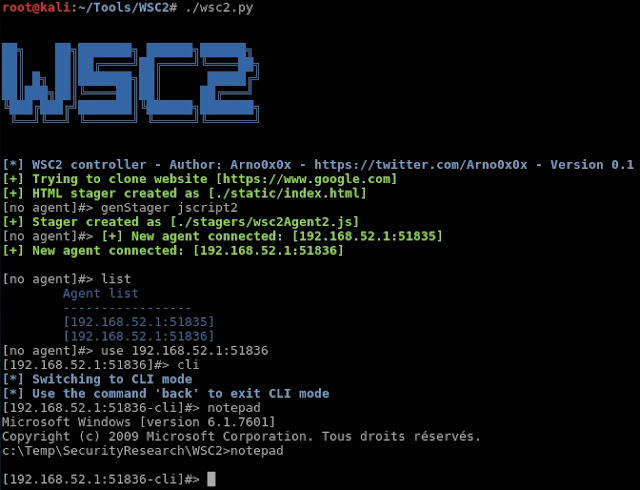
WSC2 is a PoC of using the WebSockets and a browser process to serve as a C2 communication channel between an agent, running on the target system, and a controller acting as the actuel C2 server.

Background information
Check this blog post to get some context and insight on the developpment of this tool:
Using WebSockets and IE/Edge for C2 communications

Architecture
WSC2 is composed of:
  • a controller, written in Python, which acts as the C2 server
  • an agent running on the target system, delivered to the target system via various initial stagers
  • various flavors of initial stages (created from the controller interface) used for the initial compromission of the target system.

Features
WSC2 main features:
  • Various stager (powershell one liner, various JScript file) - this is not limited, you can easily come up with your own stagers, check the templates folder to get an idea
  • Interactive shell (with environment persistency)
  • File transfer back and forth between the agent and C2
  • Multiple agents support

Installation & Configuration
Installation is pretty straight forward:
  • Git clone this repository: git clone https://github.com/Arno0x/WSC2 WSC2
  • cd into the WSC2 folder: cd WSC2
  • Install the python dependencies: pip install -r requirements.txt
  • Give the execution rights to the main script: chmod +x wsc2.py
Check the configuration file config.py and ensure the default config fits your needs.
Start the controller by typing: ./wsc2.py.

Compiling your own agent
The JScript agent (stager 'jscript1') doesn't need to be compiled.
The 'jscript2', 'jscript3' and 'psoneliner' stagers are based on a .Net assembly DLL that you can choose to build on your own/modify, based on the source code provided.
Although it is perfectly OK to use the provided wsc2.dll, you can very easily compile your own agent, from the source code provided. You'll need Visual Studio installed.
Create a .Net (Visual C#) Class Libray projet. Add the wsc2Agent.cs source file as the main source code file.
Add the following references to your project:
  1. Microsoft HTML Object Library (MSHTML)
  2. Microsoft Internet Controls (SHDocVw)
Build !

Author: Arno0x0x - @Arno0x0x

WSC2 - A WebSocket C2 Tool


Use nmap to scan hidden "onion" services on the Tor network. Minimal image based on alpine, using proxychains to wrap nmap. Tor and dnsmasq are run as daemons via s6, and proxychains wraps nmap to use the Tor SOCKS proxy on port 9050. Tor is also configured via DNSPort to anonymously resolve DNS requests to port 9053. dnsmasq is configured to with this localhost:9053 as an authority DNS server. Proxychains is configured to proxy DNS through the local resolver, so all DNS requests will go through Tor and applications can resolve .onion addresses.

Example:
$ docker run --rm -it milesrichardson/onion-nmap -p 80,443 facebookcorewwwi.onion
[tor_wait] Wait for Tor to boot... (might take a while)
[tor_wait] Done. Tor booted.
[nmap onion] nmap -p 80,443 facebookcorewwwi.onion
[proxychains] config file found: /etc/proxychains.conf
[proxychains] preloading /usr/lib/libproxychains4.so
[proxychains] DLL init: proxychains-ng 4.12

Starting Nmap 7.60 ( https://nmap.org ) at 2017-10-23 16:17 UTC
[proxychains] Dynamic chain ... 127.0.0.1:9050 ... facebookcorewwwi.onion:443 ... OK
[proxychains] Dynamic chain ... 127.0.0.1:9050 ... facebookcorewwwi.onion:80 ... OK
Nmap scan report for facebookcorewwwi.onion (224.0.0.1)
Host is up (2.7s latency).

PORT STATE SERVICE
80/tcp open http
443/tcp open https

Nmap done: 1 IP address (1 host up) scanned in 3.58 seconds

How it works:
When the container boots, it launches Tor and dnsmasq as daemons. The tor_wait script then waits for the Tor SOCKS proxy to be up before executing your command.

Arguments:
By default, args to docker run are passed to /bin/nmap which calls nmap with args -sT -PN -n "$@" necessary for it to work over Tor (via explainshell.com).
For example, this:
docker run --rm -it milesrichardson/onion-nmap -p 80,443 facebookcorewwwi.onion
will be executed as:
proxychains4 -f /etc/proxychains.conf /usr/bin/nmap -sT -PN -n -p 80,443 facebookcorewwwi.onion
In addition to the custom script for nmap, custom wrapper scripts for curl and nc exist to wrap them in proxychains, at /bin/curl and /bin/nc. To call them, simply specify curl or nc as the first argument to docker run. For example:
docker run --rm -it milesrichardson/onion-nmap nc -z 80 facebookcorewwwi.onion
will be executed as:
proxychains4 -f /etc/proxychains.conf /usr/bin/nc -z 80 facebookcorewwwi.onion
and
docker run --rm -it milesrichardson/onion-nmap curl -I https://facebookcorewwwi.onion
will be executed as:
proxychains4 -f /etc/proxychains.conf /usr/bin/curl -I https://facebookcorewwwi.onion
If you want to call any other command, including the original /usr/bin/nmap or /usr/bin/nc or /usr/bin/curl you can specify it as the first argument to docker run, e.g.:
docker run --rm -it milesrichardson/onion-nmap /usr/bin/curl -x socks4h://localhost:9050 https://facebookcorewwwi.onion

Environment variables:
There is only one environment variable: DEBUG_LEVEL. If you set it to anything other than 0, more debugging info will be printed (specifically, the attempted to connections to Tor while waiting for it to boot). Example:
$ docker run -e DEBUG_LEVEL=1 --rm -it milesrichardson/onion-nmap -p 80,443 facebookcorewwwi.onion
[tor_wait] Wait for Tor to boot... (might take a while)
[tor_wait retry 0] Check socket is open on localhost:9050...
[tor_wait retry 0] Socket OPEN on localhost:9050
[tor_wait retry 0] Check SOCKS proxy is up on localhost:9050 (timeout 2 )...
[tor_wait retry 0] SOCKS proxy DOWN on localhost:9050, try again...
[tor_wait retry 1] Check socket is open on localhost:9050...
[tor_wait retry 1] Socket OPEN on localhost:9050
[tor_wait retry 1] Check SOCKS proxy is up on localhost:9050 (timeout 4 )...
[tor_wait retry 1] SOCKS proxy DOWN on localhost:9050, try again...
[tor_wait retry 2] Check socket is open on localhost:9050...
[tor_wait retry 2] Socket OPEN on localhost:9050
[tor_wait retry 2] Check SOCKS proxy is up on localhost:9050 (timeout 6 )...
[tor_wait retry 2] SOCKS proxy UP on localhost:9050
[tor_wait] Done. Tor booted.
[nmap onion] nmap -p 80,443 facebookcorewwwi.onion
[proxychains] config file found: /etc/proxychains.conf
[proxychains] preloading /usr/lib/libproxychains4.so
[proxychains] DLL init: proxychains-ng 4.12

Starting Nmap 7.60 ( https://nmap.org ) at 2017-10-23 16:34 UTC
[proxychains] Dynamic chain ... 127.0.0.1:9050 ... facebookcorewwwi.onion:443 ... OK
[proxychains] Dynamic chain ... 127.0.0.1:9050 ... facebookcorewwwi.onion:80 ... OK
Nmap scan report for facebookcorewwwi.onion (224.0.0.1)
Host is up (2.8s latency).

PORT STATE SERVICE
80/tcp open http
443/tcp open https

Nmap done: 1 IP address (1 host up) scanned in 4.05 seconds


docker-onion-nmap - Scan .onion hidden services with nmap using Tor, proxychains and dnsmasq in a minimal alpine Docker container